mizore / notes
While using Obsidian on Plasma Wayland, I noticed that whenever Obsidian was already open, clicking Add to Obsidian in Chrome's Obsidian Web Clipper extension created a completely blank note.
The content would only show up properly if I closed Obsidian completely before clipping from Web Clipper.
Cause
This isn't because Web Clipper failed to capture the page—it's because KDE prevented the already-running Obsidian instance from properly receiving focus.
When Web Clipper hands page content over to Obsidian, Obsidian needs to be raised and focused properly to read the incoming data. Under KDE's default window management rules, an Obsidian instance running in the background can be blocked from stealing focus, so the clipped content is never written and you end up with an empty note.
Analysis
The key symptoms are:
- Clipping works normally when Obsidian is closed;
- Clipping produces an empty note when Obsidian is already open;
- This means the browser extension itself is working fine;
- The failure happens when Obsidian is already running and KDE prevents it from responding properly to Web Clipper's activation request.
So this is a window focus and activation permission issue in KDE, not a misconfiguration in your Obsidian vault, templates, or Chrome extension.
Solution
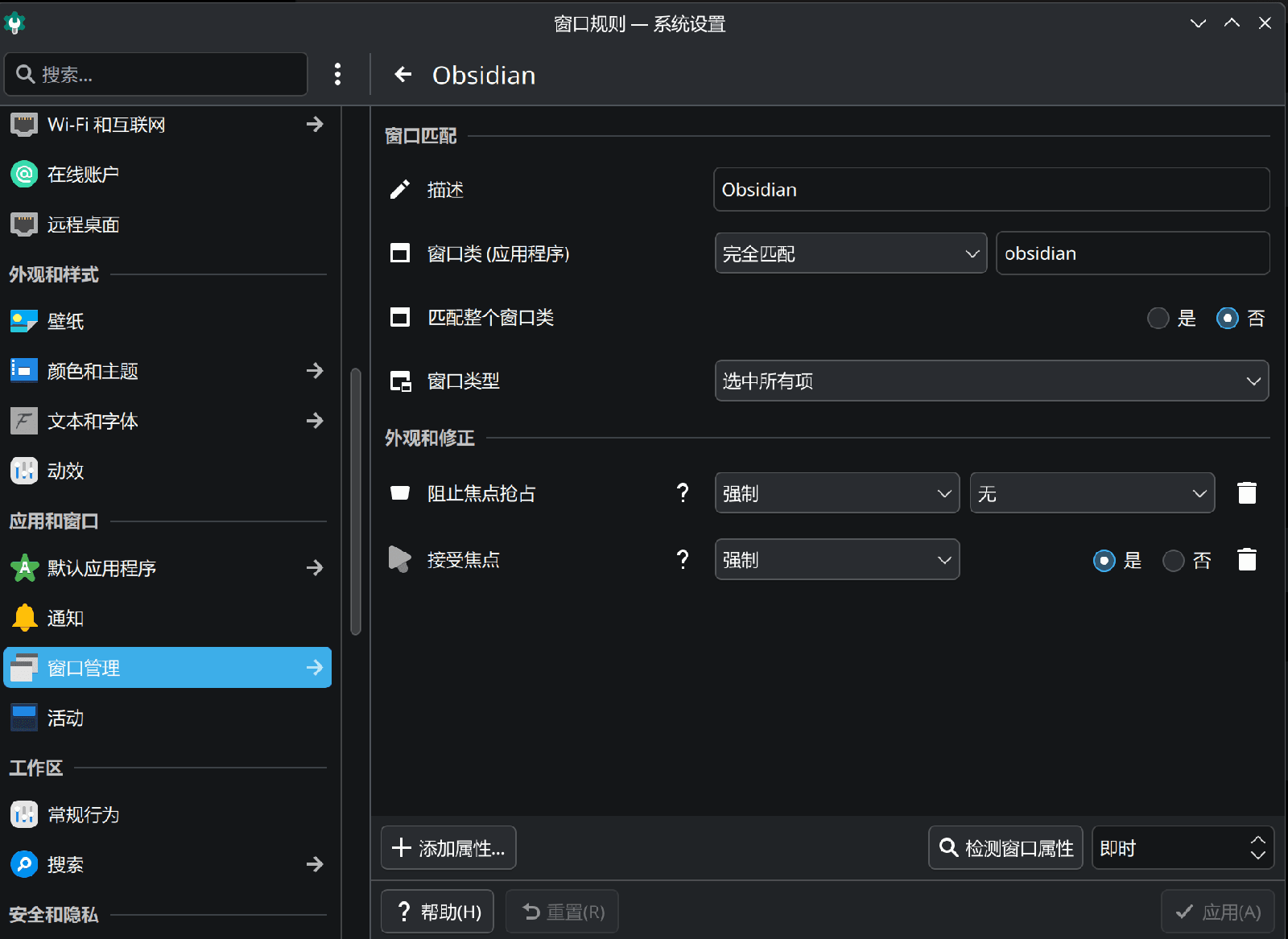
Add a window rule for Obsidian in KDE: open System Settings → Window Management → Window Rules and configure it as shown below.