 mizore / notes
Pulling tens of gigabytes of datasets or backups from Google Drive over a proxy usually burns through expensive data quotas and bottlenecks on proxy node bandwidth; downloading in a browser often drops partway through and forces you to start over. To solve this, I wrote gdirect: a terminal tool for browsing, downloading, uploading, and mounting Google Drive.
This post is organized into three parts: a quick TL;DR on how it "disguises" connections to reach Google directly, a ready-to-use installation and 10-minute illustrated setup guide, and finally a technical deep dive into the underlying source code.
TL;DR: How Do We Connect Directly Without a Proxy?
On networks in mainland China, Google Drive's domains (drive.google.com, www.googleapis.com, drive.usercontent.google.com) are blocked. At the same time, to keep basic services like Chrome updates, Android connectivity checks, and Google Fonts working in mainland China, Google maintains a pool of directly reachable edge servers inside domestic carrier backbones (China Telecom, Unicom, and Mobile)—the domestic IPs (such as Guangzhou Telecom's 183.56.143.147) behind the domains categorized under google-cn in routing rulesets like DustinWin/ruleset_geodata (dl.google.com, g.cn, fonts.googleapis.com, etc.).
Here is the key insight: those domestic google-cn edge nodes run the exact same unified reverse proxy—Google Front End (GFE)—connected over Google's private backbone to the global Drive backends, and they present valid official TLS certificates for *.googleapis.com and *.googleusercontent.com.
gdirect takes advantage of this by "borrowing a domestic google-cn IP at the transport layer while sending authentic Google Drive requests (domains and certificate checks) at the application layer":
- Point underlying TCP sockets at domestic
google-cnnode IPs: Bypassing poisoned system DNS,gdirectstarts from a built-in seed IP (183.56.143.147) and candidate pool, connecting directly to port 443. Candidates that pass live probes (verifying an official Google TLS certificate + a valid Drive v3 API response) are cached in local SQLite. During socket creation (via Rust'sreqwest::resolveand a customgetaddrinfohook in patched C++libaria2), even across multiple cross-domain HTTP 302 redirects mid-download, every target IP is pinned to that domesticgoogle-cnnode—so the physical packet path stays inside domestic carrier backbones and never crosses the firewall. - Keep real Google Drive hostnames and strict TLS verification at the upper layers: Once connected to the domestic
google-cnIP, application-layer requests still address standardhttps://www.googleapis.com(API and chunked uploads) andhttps://drive.usercontent.google.com/https://*.googleusercontent.com(file downloads). The domestic GFE node routes the request by hostname over Google's internal backbone to fetch your Drive data, while the client strictly verifies TLS certificates against the real Google hostnames as usual (and if an ISP middlebox resets connections on cleartext SNI,--sni/--no-snican rewrite or strip the TLS SNI extension). - Separate the control plane from the data plane: Login and token refreshes (
accounts.google.com,oauth2.googleapis.com), which take only a few kilobytes, go through the normal system network (your proxy) so authentication always works; bandwidth-heavy directory listing, multi-connection concurrent downloads, and 32 MiB resumable uploads all go straight through the domesticgoogle-cnIP—saturating your local broadband without spending a single byte of proxy traffic.
| Traffic Type | Commands / Domains | Route |
|---|---|---|
| Drive API, downloads, uploads | browse, ls, download, upload (www.googleapis.com, drive.usercontent.google.com, *.googleusercontent.com) |
Scanned domestic google-cn IP. Hostnames and TLS certificate verification remain unchanged; --sni / --no-sni can rewrite or strip TLS SNI |
| Login & token refresh | login and automatic token refresh (accounts.google.com, oauth2.googleapis.com) |
System network (uses system DNS and your proxy) |
| Disk mount | mount (invokes rclone under the hood) |
System network |
Important Note for Users in Mainland China: Even if your proxy client already sets
google-cnfrom DustinWin/ruleset_geodata toDIRECT, runninggdirectwith your proxy (especially TUN mode) enabled can still end up routing your downloads through the proxy! That's because althoughgdirectconnects to agoogle-cnIP, its TLS handshake sends Google Drive hostnames (drive.usercontent.google.com,www.googleapis.com). In standard rulesets, those domains belong togoogle-cn(direct), so a TUN sniffer will inspect the TLS SNI, match the
- Add direct rules in your proxy client: explicitly route the Drive domains above (or the
gdirectprocess) toDIRECTand exclude them fromfake-ip;- Quit your proxy or disable TUN during transfers: keep your proxy on for the one-time
gdirect login, then quit the proxy (or turn off TUN mode) when runningscananddownload.
Installation
Prebuilt binaries are provided for macOS 15+ (Apple Silicon / Intel), Linux x86_64 (glibc 2.35+, e.g. Ubuntu 22.04+, Debian 12+, Fedora, Arch), and Windows x86_64.
Option 1: One-Line Install Script
macOS / Linux:
curl -fsSL https://raw.githubusercontent.com/mizorewww/gdirect/main/scripts/install.sh | bashWindows PowerShell:
& ([scriptblock]::Create((Invoke-RestMethod 'https://raw.githubusercontent.com/mizorewww/gdirect/main/scripts/install.ps1')))The installer places gdirect and its bundled cacert.pem into ~/.local/bin (%LOCALAPPDATA%\gdirect\bin on Windows).
If you also want to use gdirect mount to mount Google Drive as a local disk, pass --with-mount (-WithMount in PowerShell) to automatically install the mount dependencies (rclone 1.75.2+, plus fuse3 on Linux or WinFsp via winget on Windows):
curl -fsSL https://raw.githubusercontent.com/mizorewww/gdirect/main/scripts/install.sh | bash -s -- --with-mountOption 2: Homebrew (macOS / Linux)
brew tap mizorewww/gdirect https://github.com/mizorewww/gdirect
brew install mizorewww/gdirect/gdirect
brew install rclone # Only needed for `gdirect mount`; Linux also requires `fuse3` from your system package managerTo upgrade later, run brew update && brew upgrade gdirect.
One-Time Google Cloud Setup Guide (~10 Minutes)
To avoid rate-limiting (429 Too Many Requests) or bans caused by everyone sharing a single public OAuth client, gdirect does not ship a shared client ID. Instead, you create your own Desktop app OAuth client in your personal Google Cloud project. You only need to do this once, and it is completely free.
1. Create a Project and Enable the Drive API
-
Open the Google Cloud Console, click the project picker at the top of the page, and click New project in the top-right corner. Name it anything you like (e.g.
gdirect), leave Location as No organization for a personal account, click Create, and make sure the new project is selected at the top.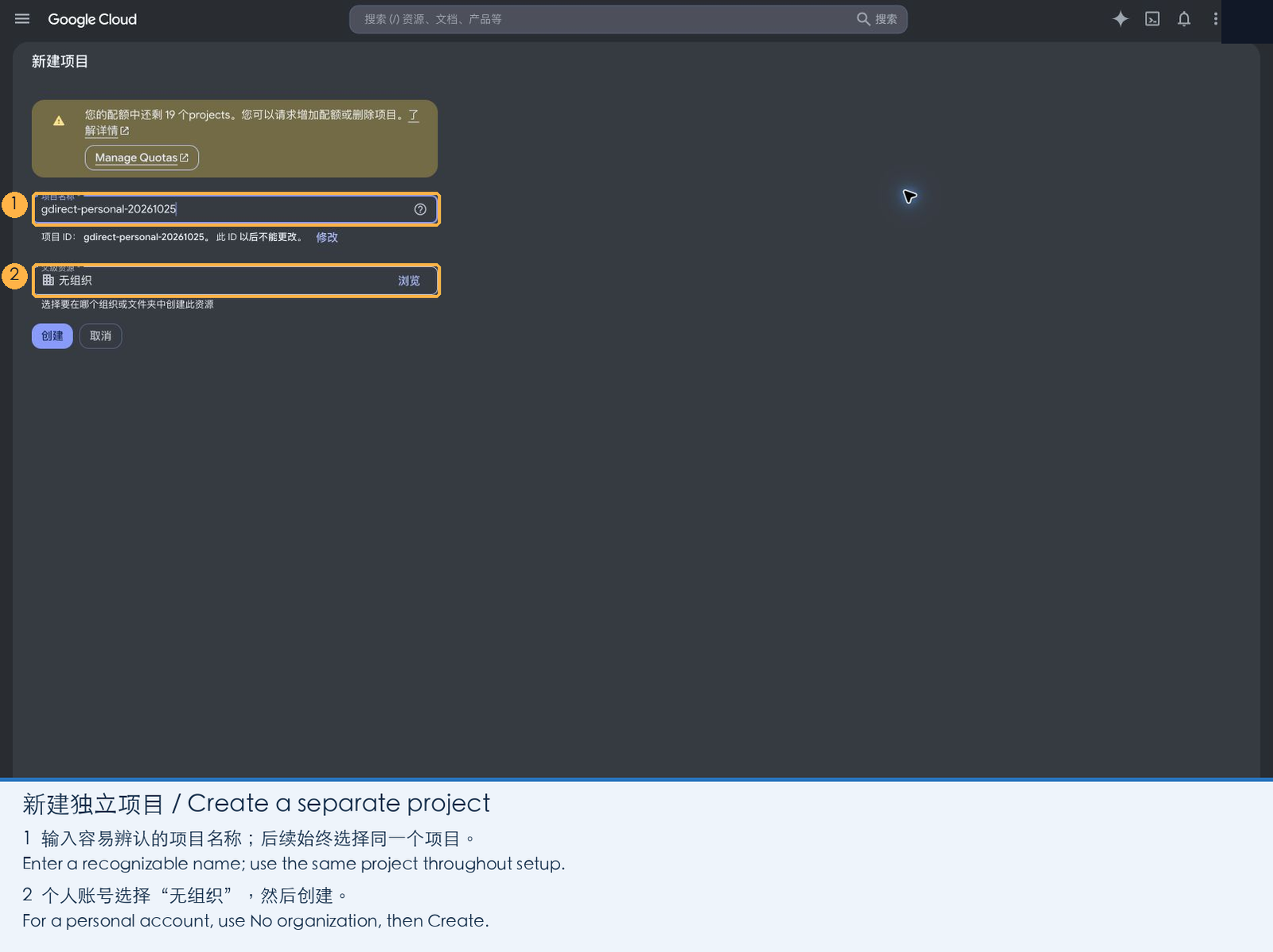
-
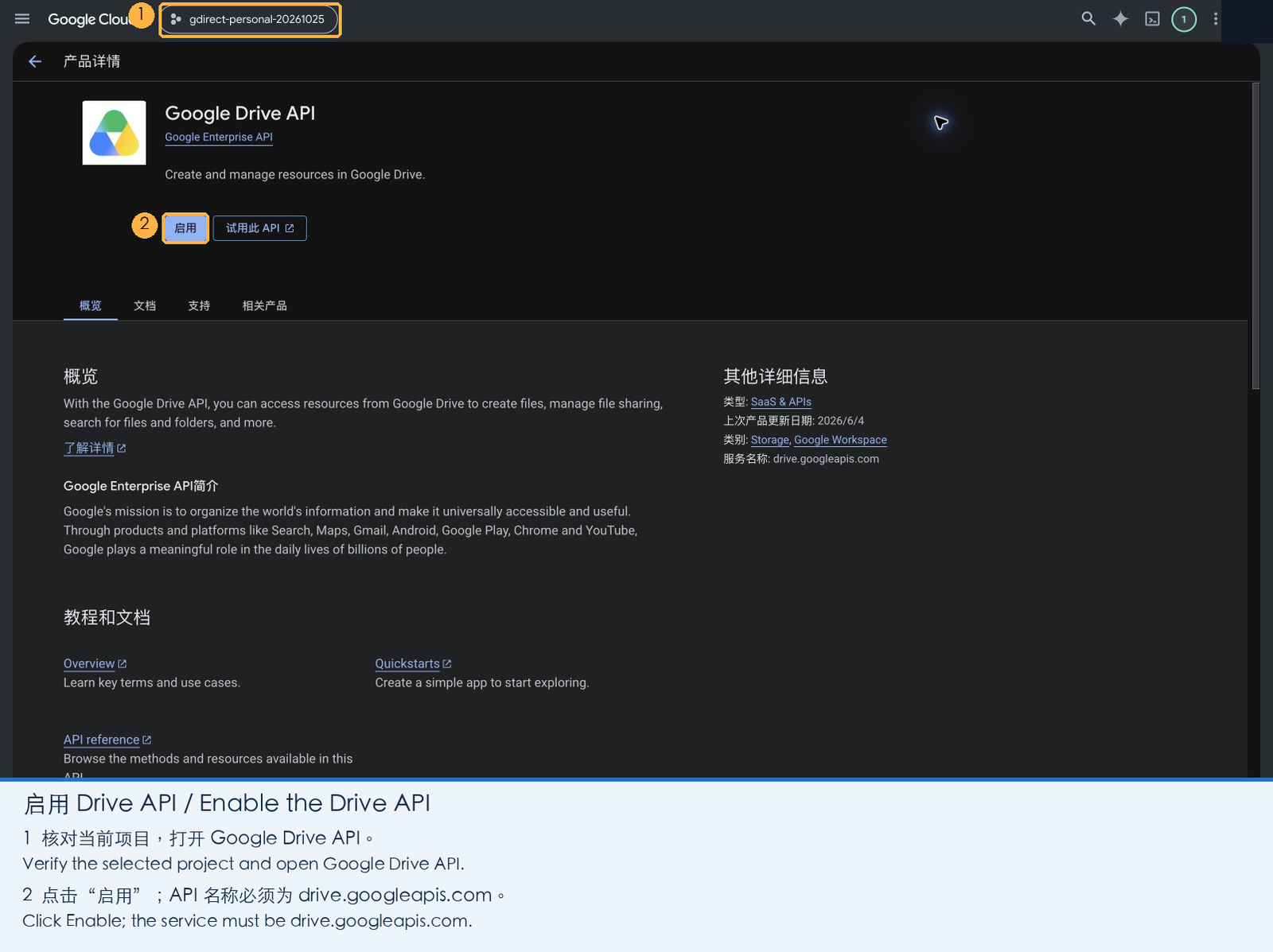
Open the Google Drive API page, confirm your new project is selected at the top, and click Enable.
Once enabled, the page shows the service name
drive.googleapis.comwith status Enabled.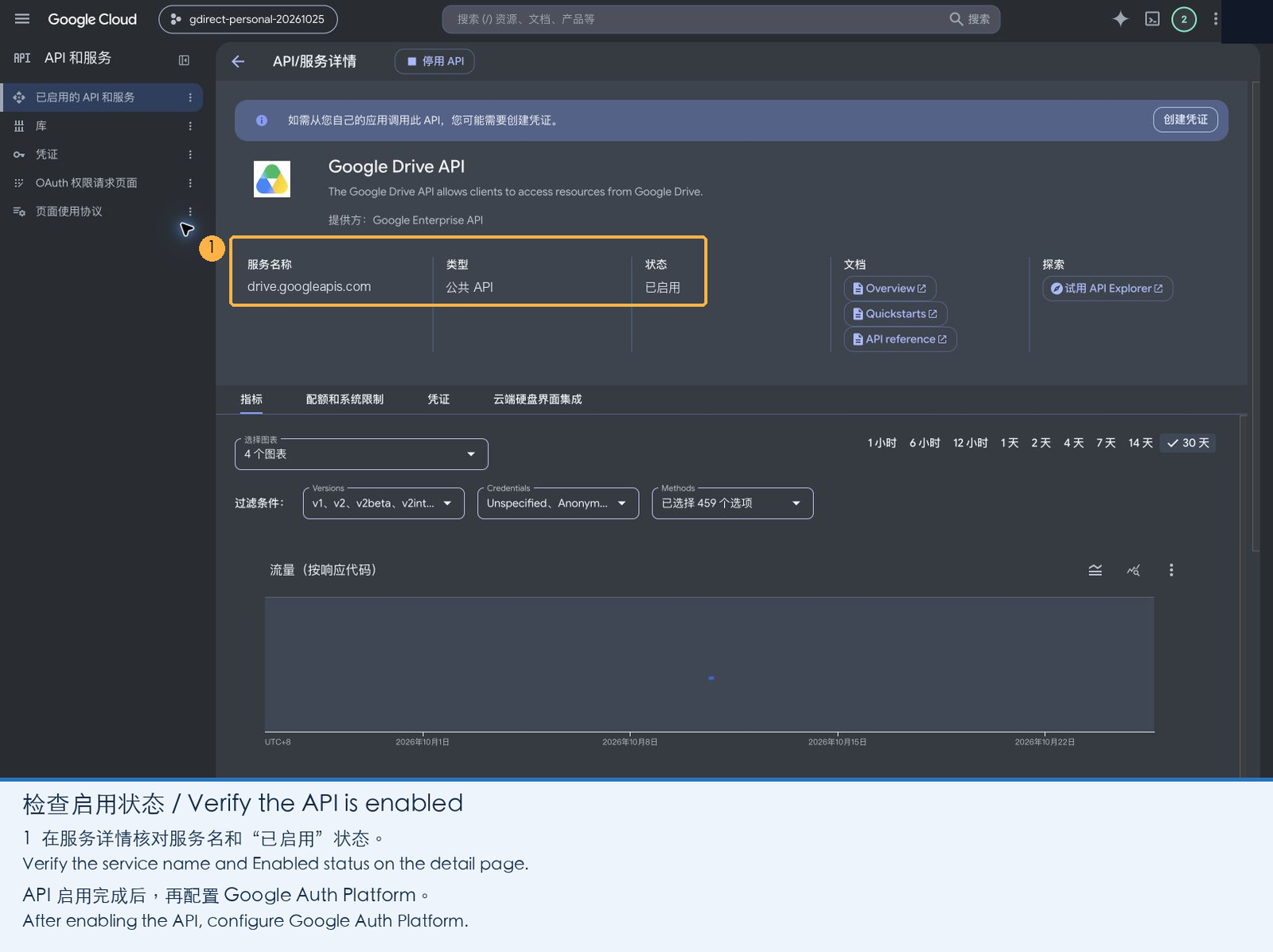
2. Configure the OAuth App
-
Open Google Auth Platform and click Get started.
-
App information: Enter an app name (e.g.
gdirect, shown on the consent screen), select your email address as the user support email, and click Next.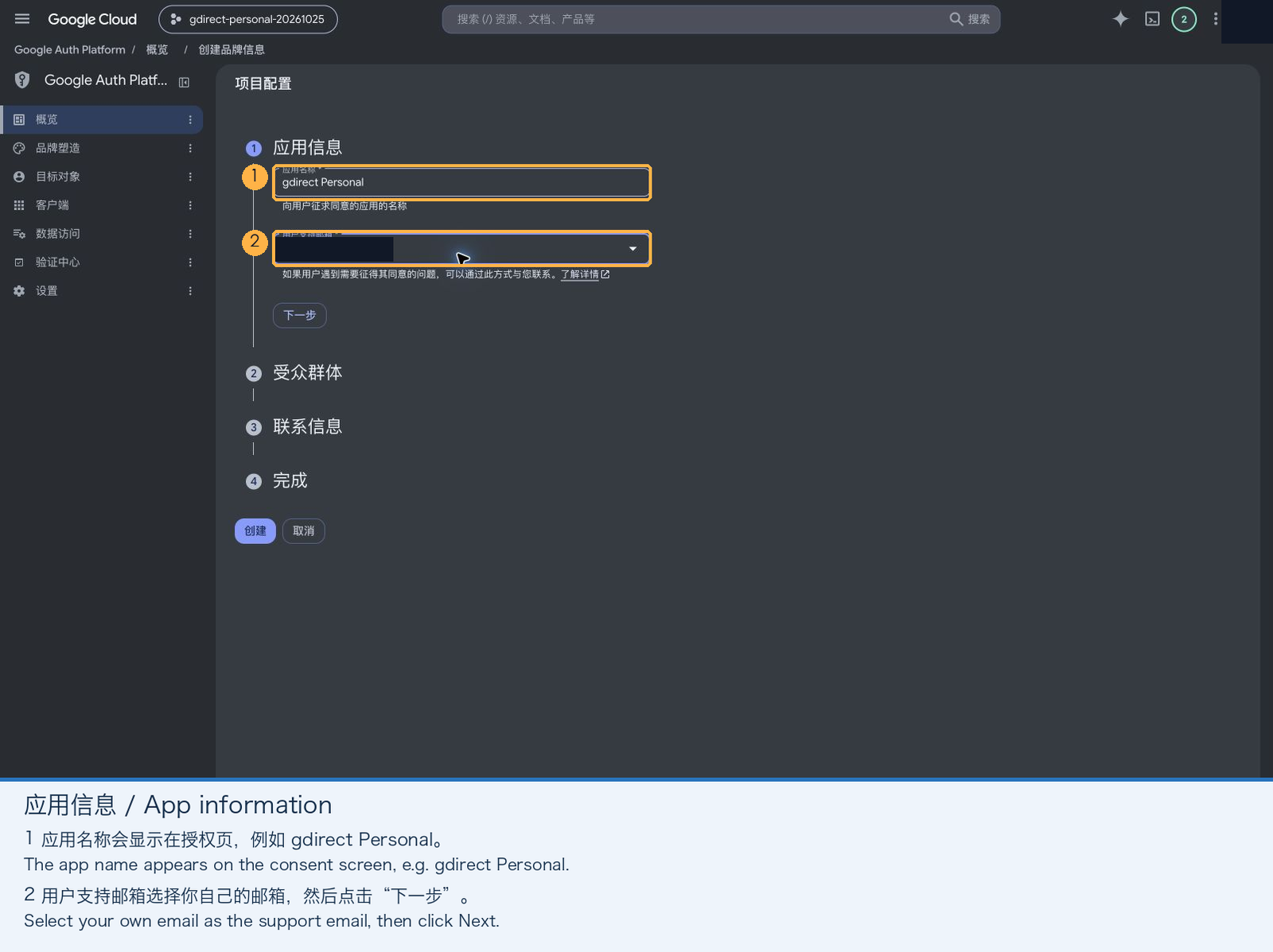
-
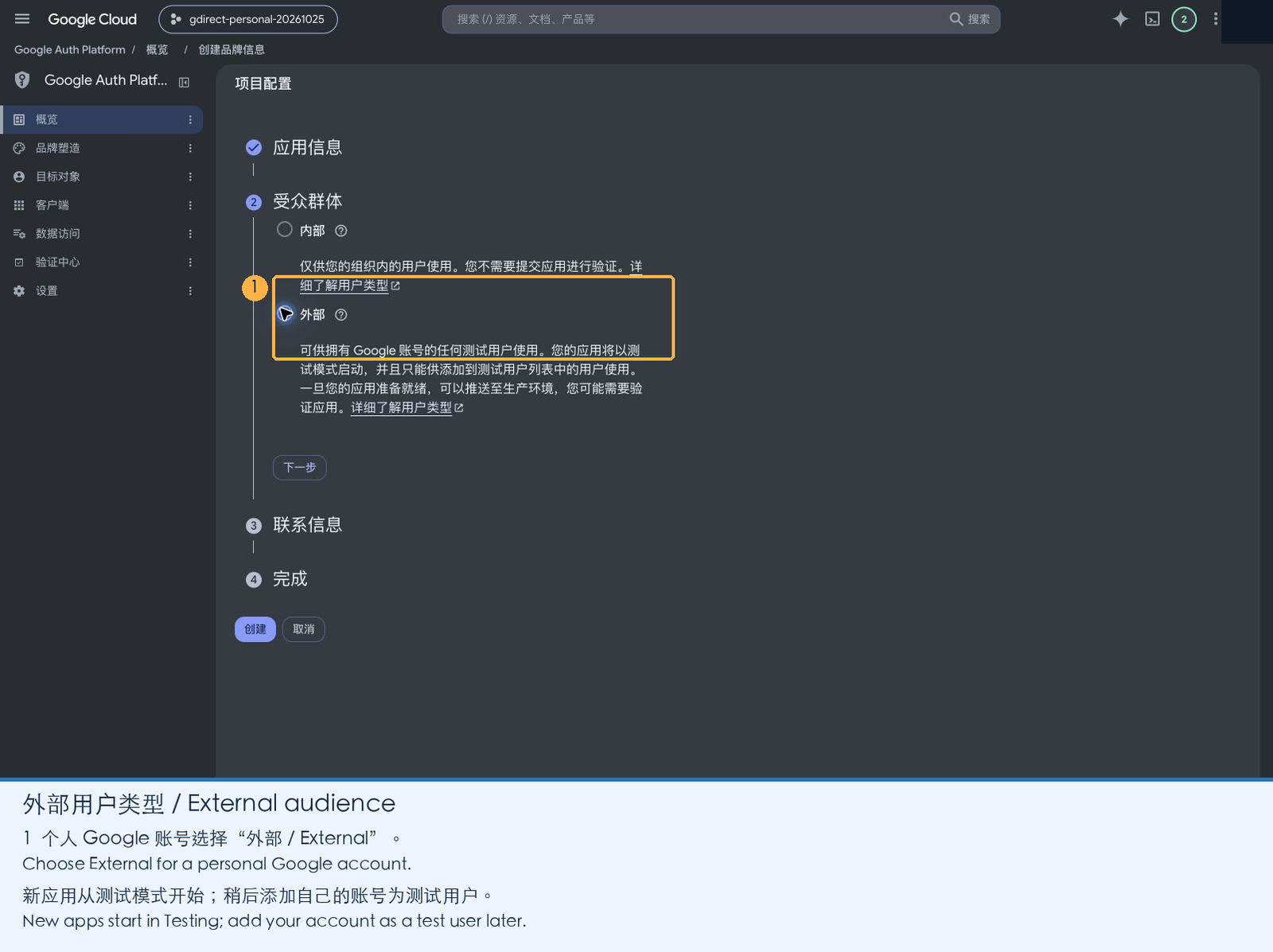
Audience: Choose External and click Next (personal accounts cannot choose Internal).
-
Contact information: Enter your email address and click Next.
-
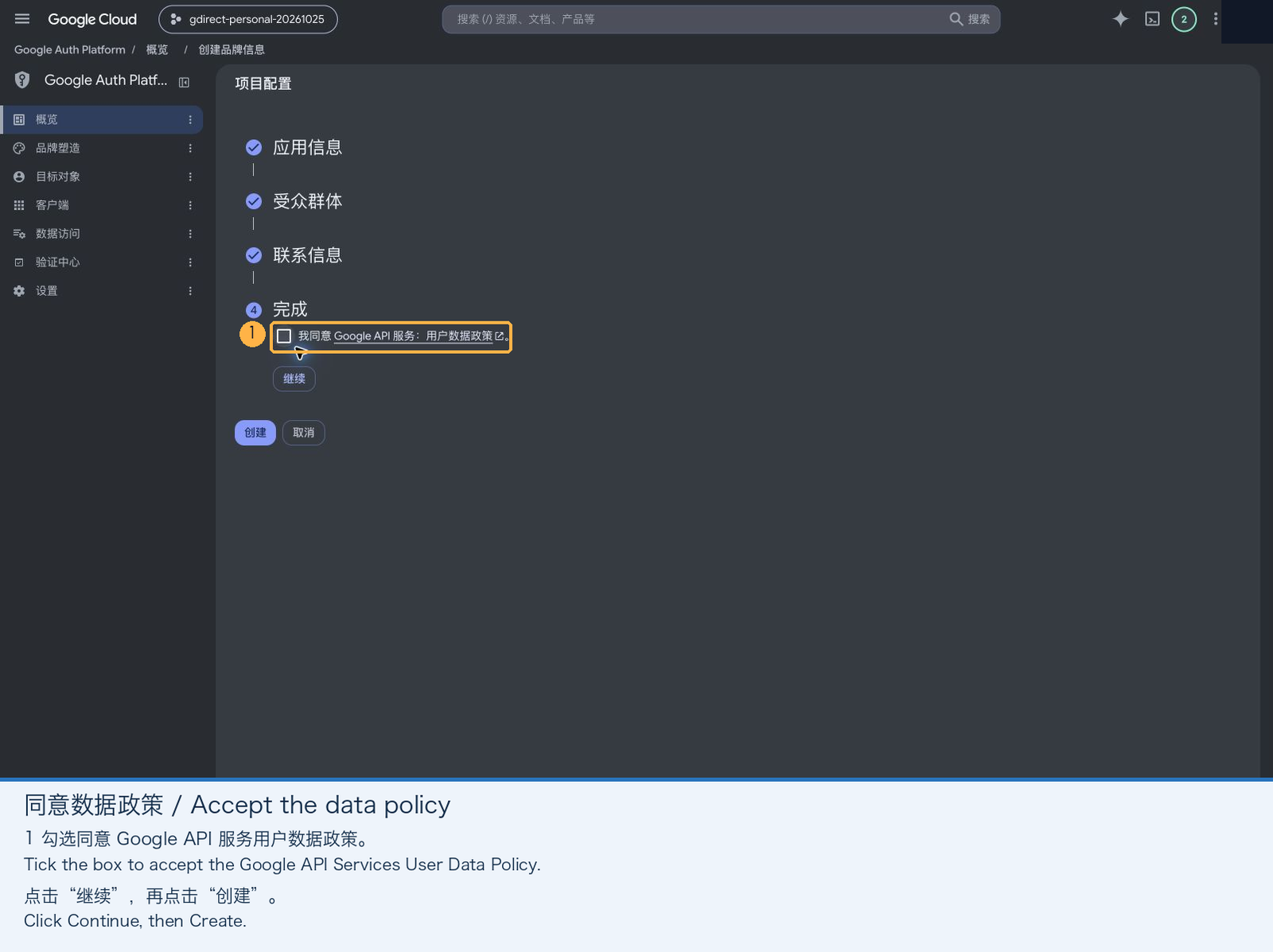
Finish: Check the box agreeing to the Google API Services User Data Policy, click Continue, and then click Create.
3. Add the Drive Scope
-
Open Data Access in the left sidebar and click Add or remove scopes.
-
In the drawer that opens, select
.../auth/drive("See, edit, create, and delete all of your Google Drive files"). If you don't see it in the table, paste the URL below into Manually add scopes, click Add to table, and then click Update:https://www.googleapis.com/auth/drive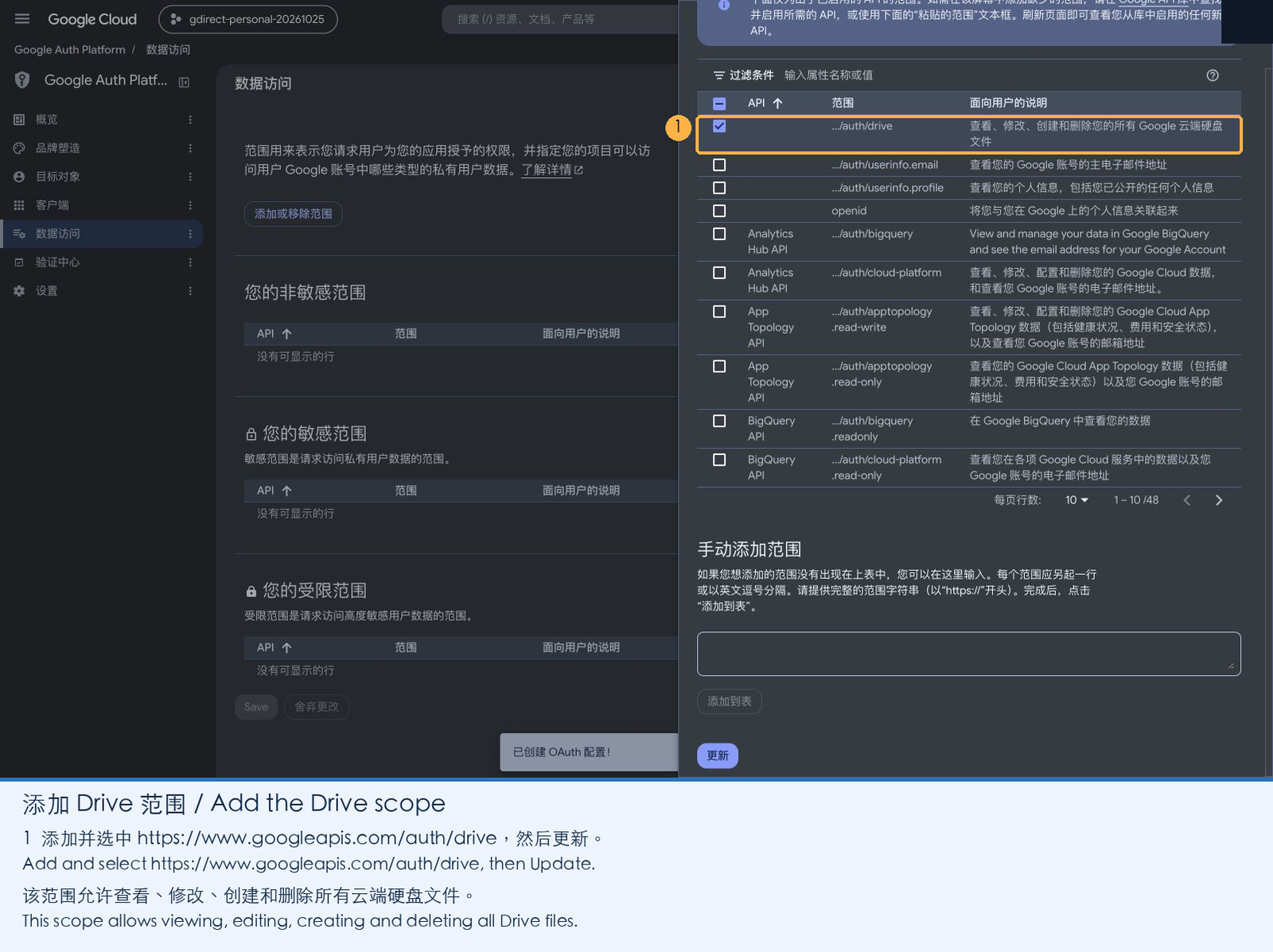
-
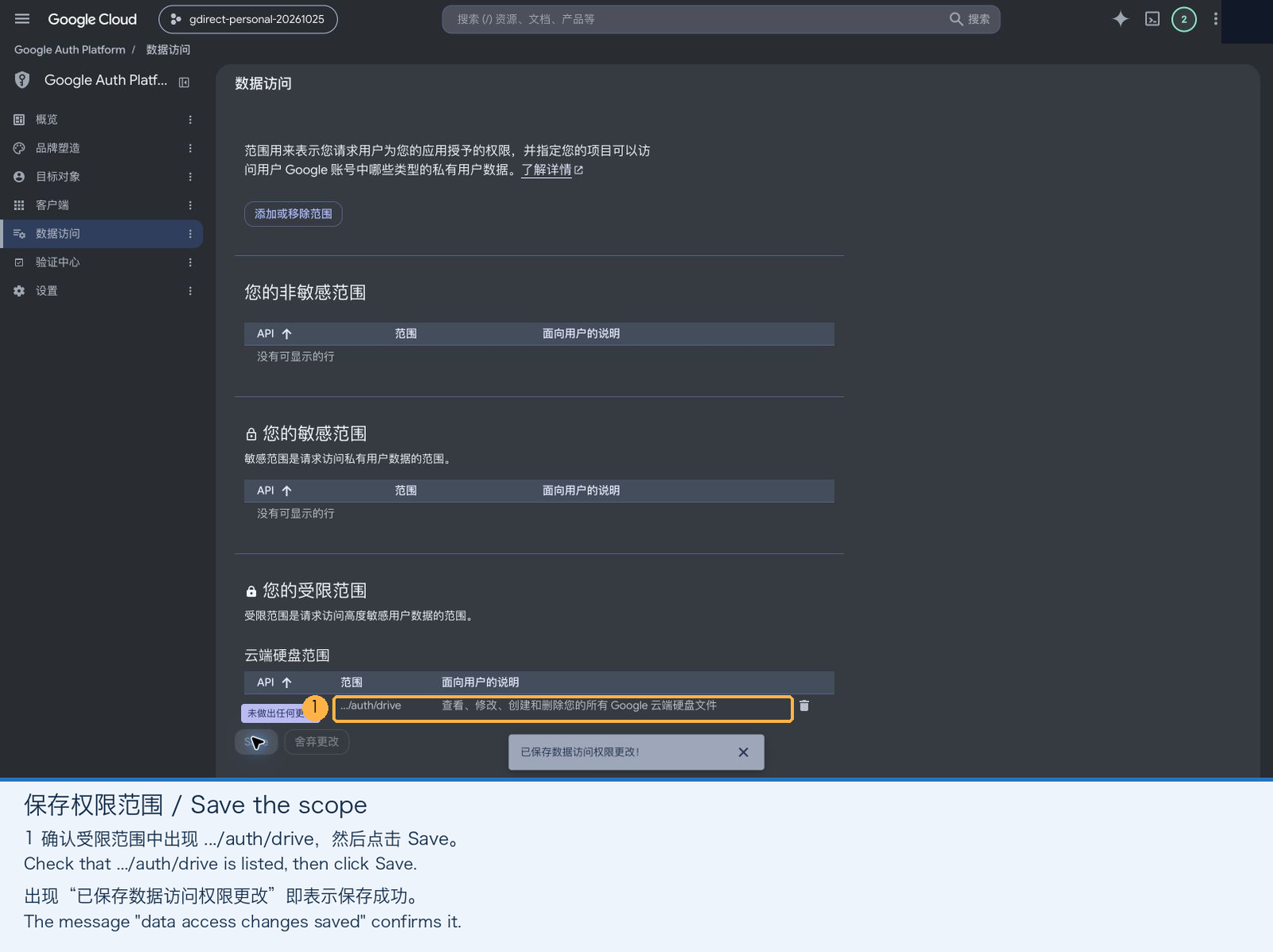
Important: After returning to the Data Access page, make sure to click Save at the bottom of the page. Clicking Update in the drawer alone does not persist the change.
4. Create a Desktop Client and Download the JSON
-
Open Clients in the left sidebar and click Create client. Set Application type to Desktop app (Web application clients, API keys, and service-account JSONs will not work), give it any name (e.g.
gdirect Desktop), and click Create.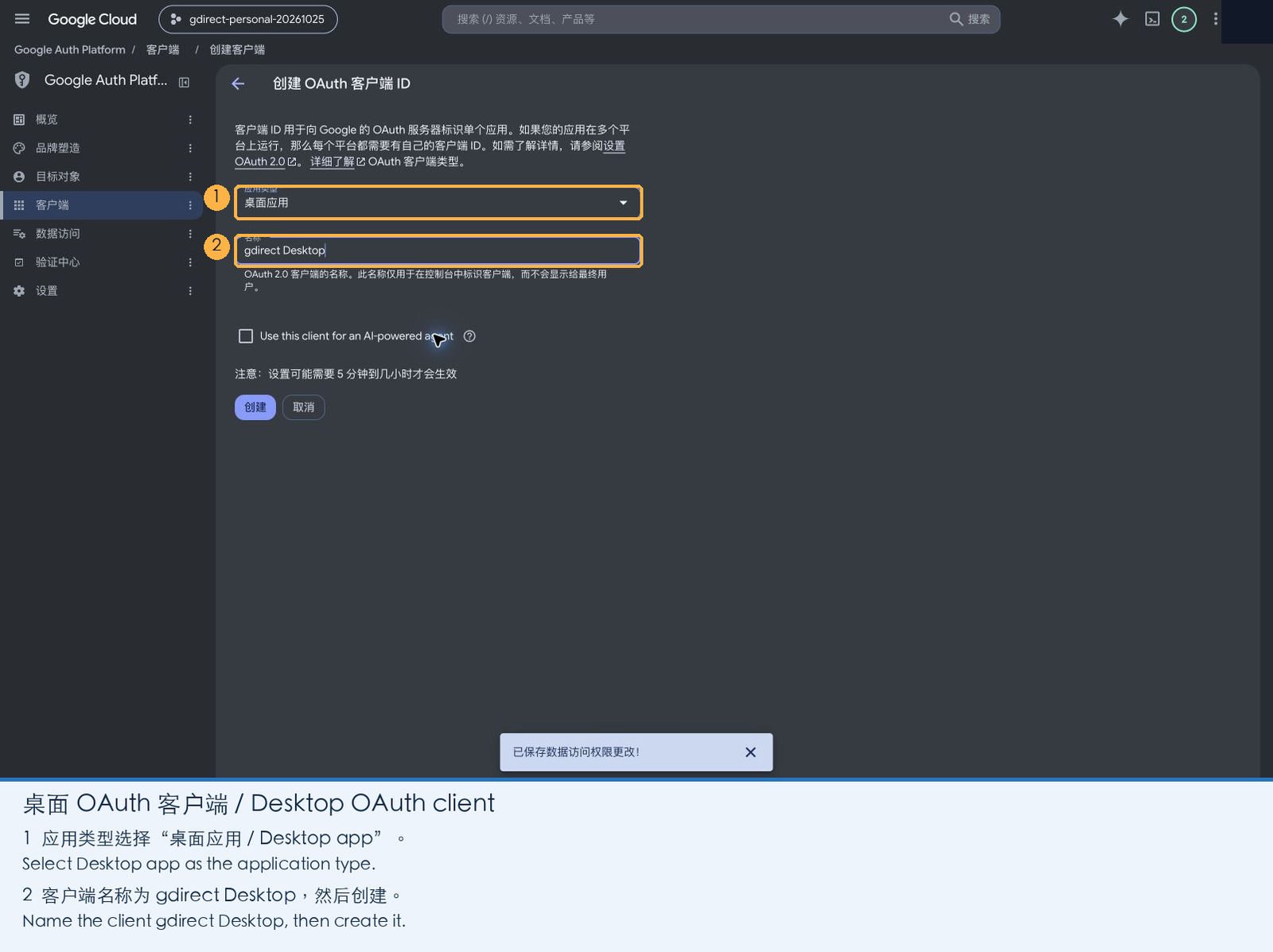
-
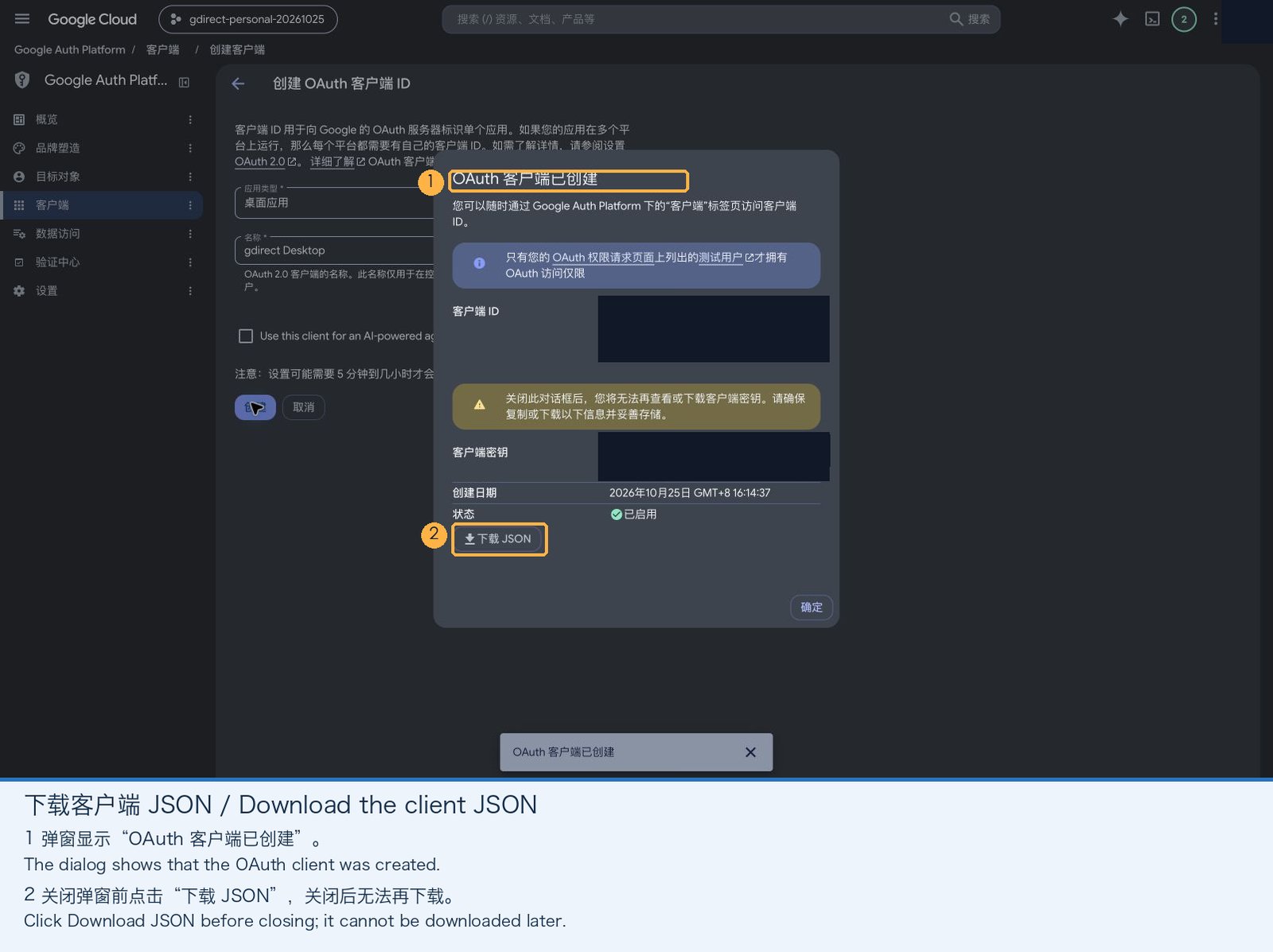
In the dialog that pops up, click Download JSON before closing the modal. Once closed, Google won't let you download the secret JSON again (if you close it by mistake, just create a new client).
5. Allow Your Account to Sign In (and Avoid the 7-Day Expiry)
Newly created apps start in Testing mode, where only listed test users are allowed to sign in:
-
Open Audience in the left sidebar, click Add users under Test users, enter the Google account email you want to use with
gdirect, and click Save.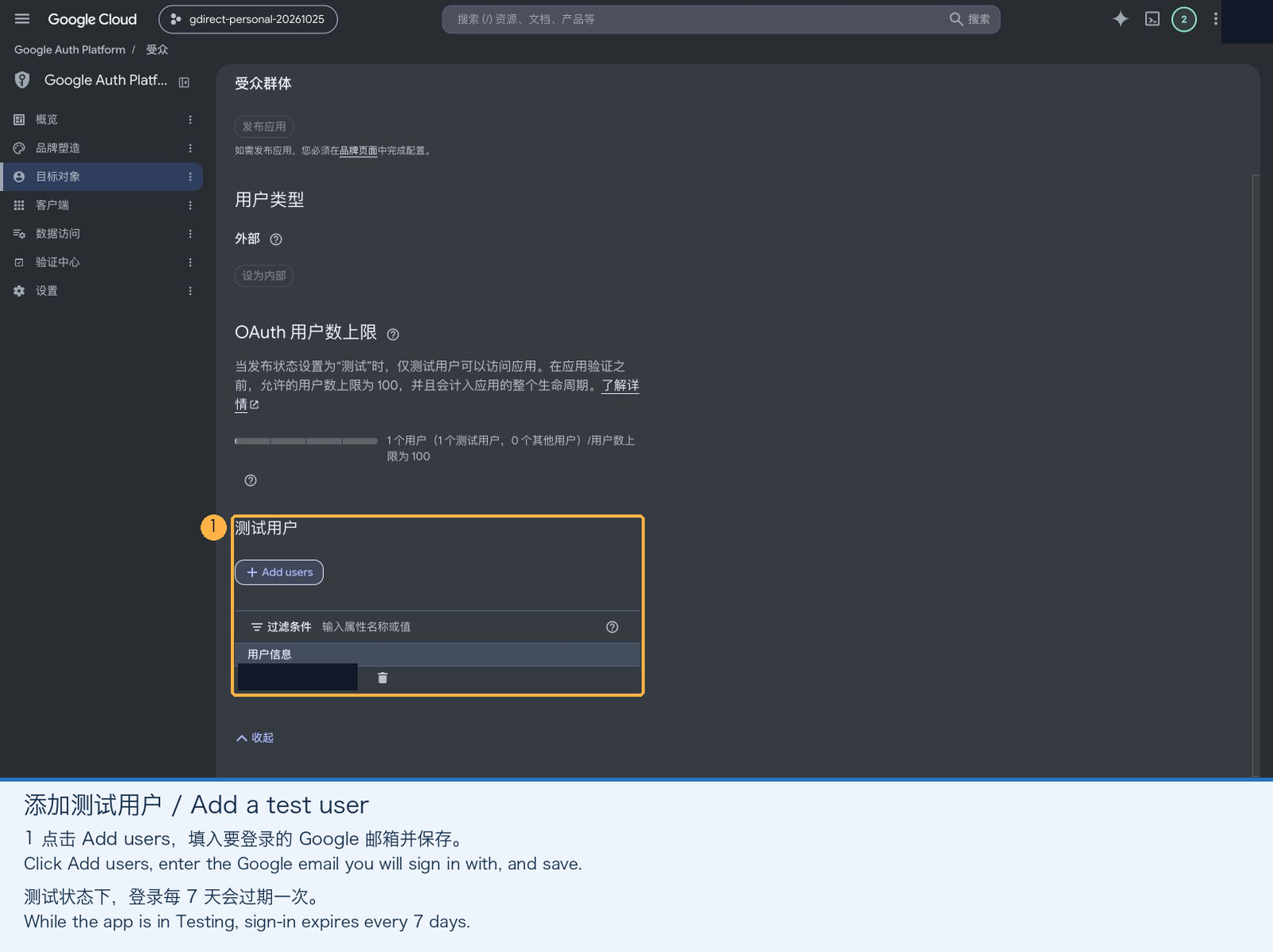
While the app stays in Testing mode, refresh tokens expire after 7 days, requiring gdirect login --reauth once a week.
If you don't want to re-authenticate every week, simply click Publish app at the top of the Audience page to switch the status to In production. A personal app used only by you does not need to go through Google's verification review, and publishing it removes the 7-day token expiration limit.
6. Log In from the Terminal
Run the command below in your terminal, replacing the path with the JSON file you downloaded:
gdirect login --client-secret ~/Downloads/client_secret.json-
Your browser will open automatically (if it doesn't, copy the URL printed in the terminal and open it in a browser on the same machine, since the OAuth flow redirects back to a temporary localhost port).
-
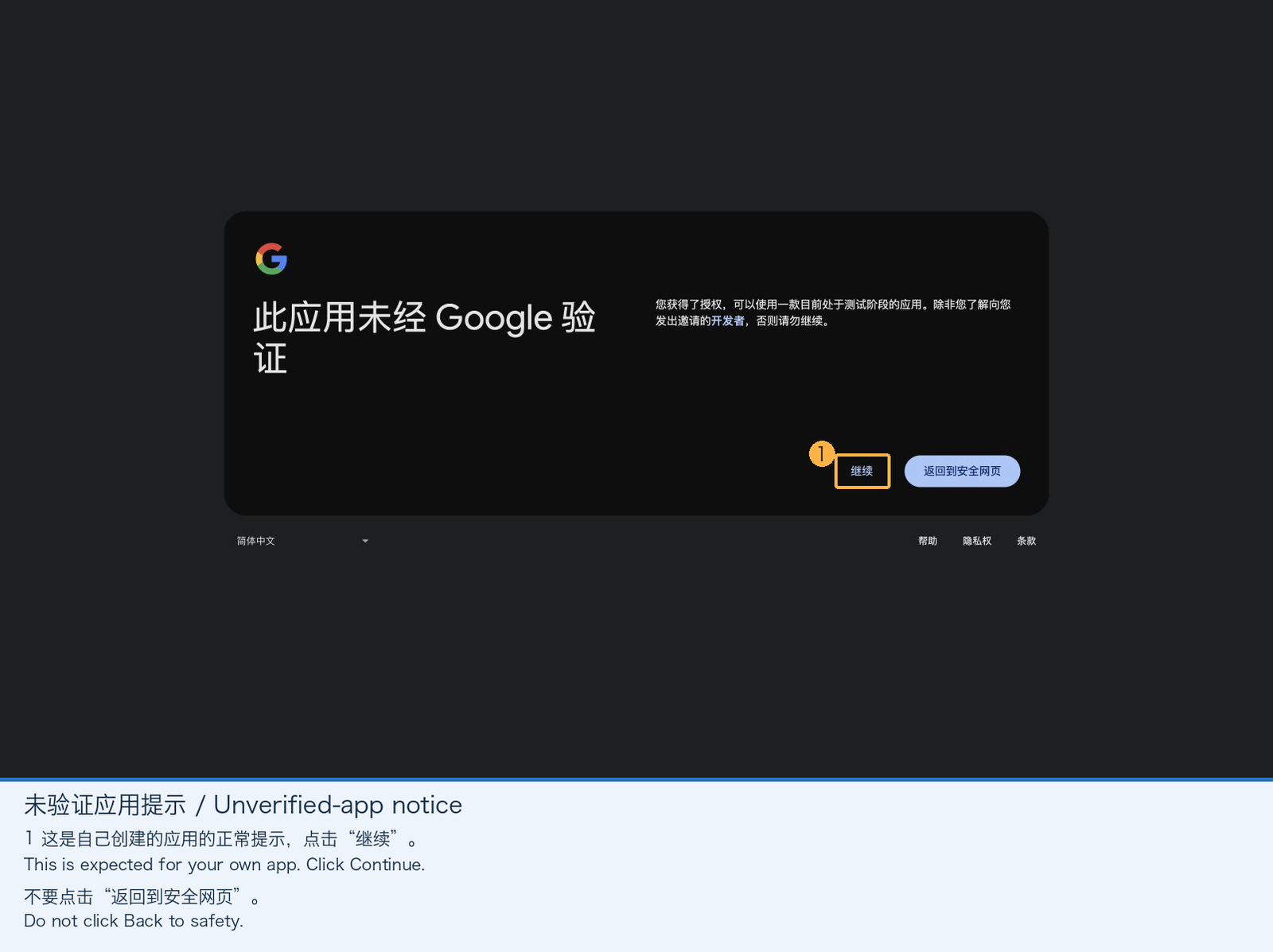
Choose your Google account. Google will warn that "Google hasn't verified this app"—this is completely normal because you just created it yourself:
- Testing mode: Click Continue (not "Back to safety").
- In production: Click Advanced in the bottom-left corner, then click Go to (unsafe).
-
Verify the app name and Google Drive permission scope, then click Continue.
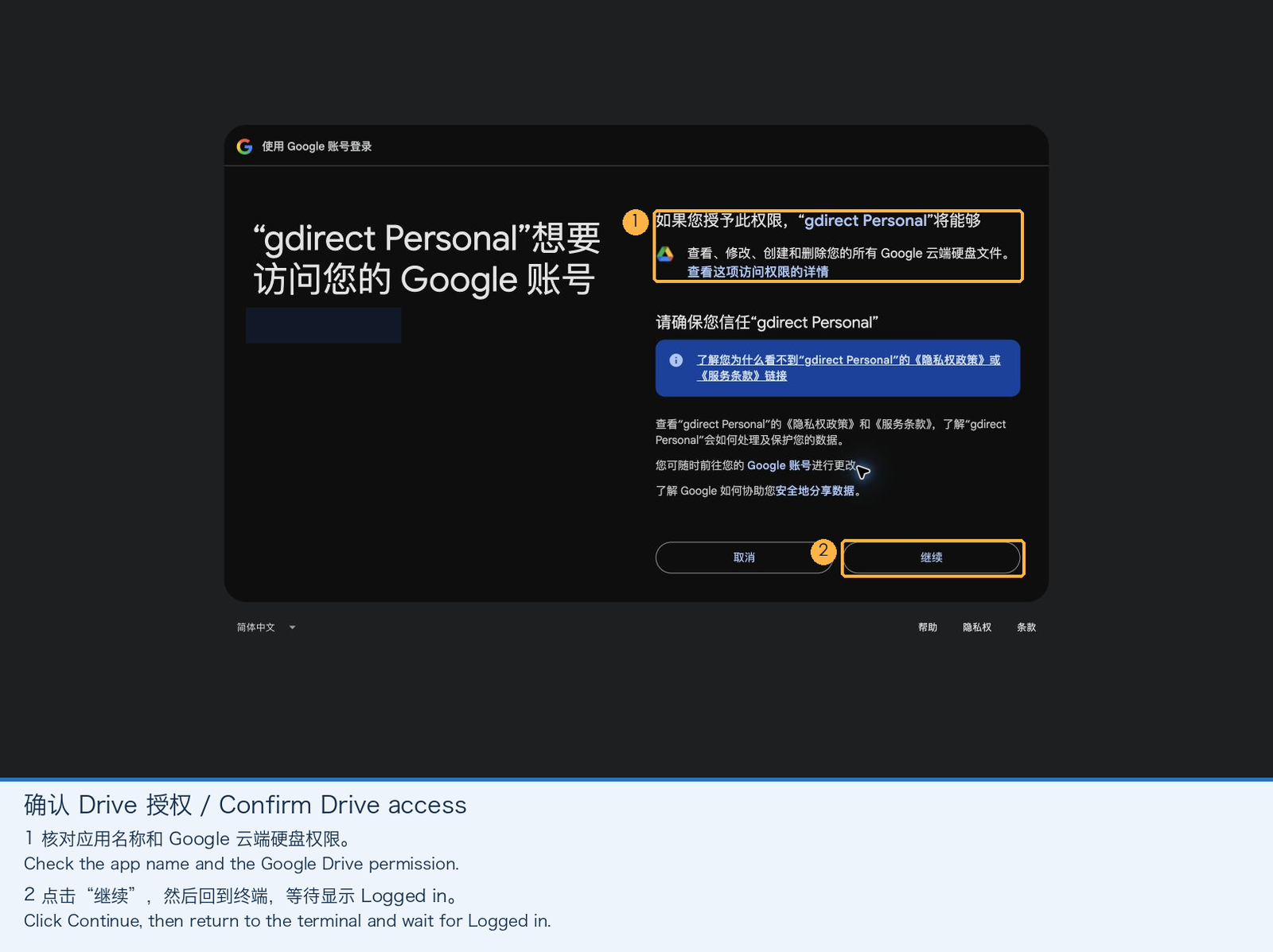
-
Back in the terminal, once you see
Logged in, you're all set. You can delete the downloaded JSON file now—the client credentials are saved inside local SQLite, and re-authenticating or switching accounts later only requiresgdirect login --reauth.
Headless Server Tip: On a remote server without a browser, you can authenticate on your desktop first, or import an existing
authorized_usercredentials JSON viagdirect login --credentials <PATH>. For scripts, you can also pass an access token directly via theGDIRECT_ACCESS_TOKENenvironment variable.
Mainland China Network and Proxy Configuration Guide
The most common question from users in mainland China is: My proxy client (sing-box / Mihomo / Clash) already uses DustinWin/ruleset_geodata and routes google-cn to DIRECT—why does gdirect traffic still get routed through my proxy?
Tracing the Packet Path: How Does a Proxy Sniffer Hijack Direct Traffic?
Even though gdirect disables HTTP/SOCKS proxy environment variables (no_proxy) at the application layer, whenever your proxy client is running—especially in TUN virtual network interface mode—every packet on the machine passes through the proxy's routing engine first. Let's trace what happens step by step:
- We borrow a
google-cnIP, but send Google Drive hostnames: At the socket layer,gdirectreplaces the destination IP with a domesticgoogle-cnedge node (such as183.56.143.147). However, so that Google's edge router knows which backend service to reach and local TLS certificate verification succeeds, the TLS handshake (ClientHelloSNI) and HTTPHostheader still carrywww.googleapis.com,drive.usercontent.google.com, and*.googleusercontent.com. - Those Google Drive domains are NOT in the
google-cnruleset! If you inspectgoogle-cnin DustinWin/ruleset_geodata, it lists domains that are natively unblocked in mainland China—such asdl.google.com,g.cn,gstatic.cn,fonts.googleapis.com, andclientservices.googleapis.com. Meanwhile,www.googleapis.com,drive.usercontent.google.com,drive.google.com, and*.googleusercontent.comare not ingoogle-cn—they all sit in the proxiedgoogleruleset. - TUN traffic sniffing (
sniff) hijacks the connection by domain: Whengdirectopens a connection to the domestic IP183.56.143.147:443, the TUN interface intercepts the packet and usessniff(TLS SNI inspection) to see that the SNI hostname isdrive.usercontent.google.comorwww.googleapis.com. The proxy then evaluates its routing rules top-to-bottom using that sniffed domain:rule_set: google-cn(DIRECT) Miss (the Drive domain isn't ingoogle-cn);rule_set: google(PROXY) Match!- Because domain rules precede IP rules in almost all proxy templates (or when
scanresolves those domains through system DNS and gets handed a198.18.x.xFake-IP), a connection physically destined for a domestic China Telecom IP gets misclassified as blocked Google traffic and shoved right back into your proxy tunnel!
Once you see why this happens, picking either one of the two approaches below solves it completely:
Approach 1: Quit Your Proxy (or Turn Off TUN) During scan and Downloads
If you don't want to touch your proxy client's routing rules, this is the simplest and cleanest workflow:
- Login phase (proxy ON): With your proxy running as usual, run
gdirect login --client-secret ...to finish authorization (openingaccounts.google.comin the browser and exchanging/refreshing tokens againstoauth2.googleapis.comrequire a proxy). - Scan & transfer phase (quit proxy, or turn off TUN mode):
- Once logged in (
gdirectcaches a short-livedaccess_tokenvalid for ~1 hour), quit your proxy client or turn off its TUN mode (if you only use System Proxy without TUN,gdirectignores system proxy environment variables automatically, though turning off TUN is the most foolproof). - Run
gdirect scanto find the fastest domesticgoogle-cnedge IP over your raw physical broadband. - Run
gdirect download ...orgdirect browseto download at full line speed (if your ISP resets connections on cleartext SNI, pass--no-sni):
- Once logged in (
gdirect scan
gdirect download FILE_ID
# If you hit connection or TLS resets (libaria2 code 1), strip SNI:
gdirect download FILE_ID --no-sniApproach 2: Add Direct Rules in Your Proxy Client for Drive Domains (or the gdirect Process)
If you keep your proxy and TUN mode running 24/7, the fix is straightforward: since the proxy hijacks traffic after sniffing the Drive hostnames, place a rule before google that routes the gdirect process (or those Drive domains) to DIRECT, just like google-cn:
- Domains that must stay on
PROXY(used only for login and token refresh):accounts.google.comoauth2.googleapis.com
- Transfer domains to route to
DIRECTand exclude fromfake-ip:drive.usercontent.google.com*.googleusercontent.comdrive.google.comwww.googleapis.com,drive.googleapis.com,content.googleapis.com
Note: Unlike
gdirect, a regular web browser visitingwww.googleapis.comdoes not rewrite the underlying socket IP to agoogle-cnnode. Routingwww.googleapis.comtoDIRECTglobally would break websites in your browser that depend on it. On desktop platforms, matching byPROCESS-NAME(gdirect) is strongly recommended.
For Mihomo (Clash), add the following before your GEOSITE,google rule:
dns:
  fake-ip-filter:
    - "www.googleapis.com"
    - "drive.googleapis.com"
    - "content.googleapis.com"
    - "drive.usercontent.google.com"
    - "drive.google.com"
    - "+.googleusercontent.com"

rules:
  # 1. Keep OAuth login and token refresh on PROXY
  - DOMAIN,accounts.google.com,PROXY
  - DOMAIN,oauth2.googleapis.com,PROXY

  # 2. Recommended: force all other traffic from the gdirect process (scan, API, download, upload) to DIRECT so sniffed domain rules don't hijack it
  - PROCESS-NAME,gdirect,DIRECT

  # 3. Or route by domain (place before GEOSITE,google / RULE-SET,google):
  - DOMAIN,drive.usercontent.google.com,DIRECT
  - DOMAIN-SUFFIX,googleusercontent.com,DIRECT
  - DOMAIN,www.googleapis.com,DIRECT
  - DOMAIN,drive.googleapis.com,DIRECT
- DOMAIN,content.googleapis.com,DIRECTIf you use sing-box, add an equivalent process-name or domain direct rule before rule_set: ["google"] in route.rules (while keeping oauth2.googleapis.com proxied) to enjoy zero-proxy-quota full-speed Drive transfers with TUN left on all day.
Daily Usage & Troubleshooting Reference
Common Commands
gdirect                                   # Same as `gdirect browse`, opens the interactive TUI
gdirect browse -o ~/Downloads             # Set download directory (defaults to ./downloads)
gdirect ls root --json                    # List directory contents (supports JSON output)
gdirect download <FILE_ID_OR_SHARE_URL>   # Download a file; re-run the same command to resume after interruption
gdirect download FILE_ID -o file.zip
gdirect download DOC_ID --export application/pdf -o doc.pdf
gdirect upload ./file.zip                 # 32 MiB chunked upload with automatic resume
gdirect upload ./file.zip --parent FOLDER_ID --name backup.zip
gdirect mount                             # Mount at ~/GoogleDrive (uses native NFS on macOS, no FUSE needed)
gdirect unmount # Unmount and clean up temporary exported credentialsInside the gdirect browse TUI, you can drive everything from the keyboard:
| Key | Action |
|---|---|
j / k, ↑ / ↓ |
Move selection up or down |
Enter, l / → |
Open folder |
h / ←, Backspace |
Go to parent folder |
d |
Queue selected item for download (Google Docs, Sheets, and Slides are exported as PDF) |
+ / - |
Adjust concurrent connections (1–16) for subsequent downloads and save as default (starts at 8) |
r |
Refresh current folder |
c |
Cancel active download while keeping partial data on disk |
q |
Quit |
For tricky network environments, download and browse also expose transport-layer overrides:
--ip IP: Force a specific Google IP, skipping automatic scan results;--sni HOST/--no-sni: Override the TLS SNI hostname, or omit the SNI extension altogether (certificates are still verified against the real Google hostname);-j N: Set concurrent connections (1–16) for this command only;gdirect scan --ips FILE: Probe a custom candidate IP list (one public IP per line,#for comments).
Troubleshooting Quick Reference
| Symptom | Fix |
|---|---|
access_denied or message that the app is being tested |
Add your Google account as a Test user, or publish the app (Step 5 of the setup guide) |
redirect_uri_mismatch |
The downloaded JSON is not from a Desktop app client; recreate it following Step 4 |
Drive API 403 … insufficient permission |
Enable the Google Drive API in the same project as your OAuth client (Step 1), save the Drive scope (click Save at the bottom in Step 3), then run gdirect login --reauth |
refresh credential expired or revoked |
Run gdirect login --reauth. If this happens every 7 days, publish the app from Testing to In production (Step 5) |
Technical Deep Dive: How Is It Implemented Under the Hood?
If you're curious about how gdirect combines Rust with a custom-patched libaria2 build to pull this off, here is a walkthrough of the source code.
1. Candidate IP Scanning & Dual-Endpoint Verification
When a transfer command runs without a verified IP from the last 24 hours in local SQLite, src/scan.rs kicks off a scan. Up to 256 candidates are assembled from three sources:
- The built-in bootstrap seed IP
183.56.143.147(from Cealing-Host—always re-probed before use, never blindly trusted); - Public IPs returned by system DNS for
www.googleapis.com,drive.usercontent.google.com, anddrive.google.com; - Historical IPs in SQLite that succeeded within the past 7 days (stale entries older than 7 days are pruned before each scan so the pool never grows unbounded).
Before entering the probe pool, public(ip) filters out private, loopback, link-local, and 198.18.0.0/15 (the default Clash / Mihomo fake-ip range) addresses. Eight worker threads then run probe(ip) concurrently:
78fn probe(ip: IpAddr) -> Result<(i64, Option<String>)> {
79    let client = Client::builder()
80        .no_proxy()
81        .redirect(reqwest::redirect::Policy::none())
82        .connect_timeout(Duration::from_secs(3))
83        .timeout(Duration::from_secs(5))
84        .resolve("www.googleapis.com", SocketAddr::new(ip, 443))
85        .resolve("drive.usercontent.google.com", SocketAddr::new(ip, 443))
86        .build()?;
87    let start = Instant::now();
88    let response = client
89        .get("https://www.googleapis.com/drive/v3/about?fields=user")
90        .send()
91        .map_err(|e| e.without_url())?;
92    ensure!(
93        response.status() == reqwest::StatusCode::UNAUTHORIZED,
94        "unexpected Drive API status {}",
95        response.status()
96    );
97    let data: serde_json::Value = response.json()?;
98    ensure!(data["error"]["code"] == 401, "invalid Drive API response");
99    let response=client.get("https://drive.usercontent.google.com/download?id=0B9P1L--7Wd2vU3VUVlFnbTgtS2c&export=download&confirm=t").send().map_err(|e|e.without_url())?;
100    let status = response.status();
101    let warning = if matches!(
102        status,
103        reqwest::StatusCode::FORBIDDEN | reqwest::StatusCode::NOT_FOUND
104    ) {
105        Some(format!("HTTP {status}"))
106    } else {
107        ensure!(status.is_success(), "Drive download probe HTTP {status}");
108        let mut bytes = Vec::new();
109        response.take(32).read_to_end(&mut bytes)?;
110        (bytes != b"spam\n").then(|| "unexpected content".into())
111    };
112    Ok((start.elapsed().as_millis() as i64, warning))
113}
Three design choices stand out in this probe:
.no_proxy()+.resolve(): Bypasses environment proxy variables and bindswww.googleapis.comanddrive.usercontent.google.comdirectly toip:443inside the HTTP client while enforcing full TLS certificate verification (chain validation + SAN hostname matching), ruling out ISP captive portals or MITM boxes.- Credential-less API verification: Calls
GET /drive/v3/about?fields=userwithout any user token. A genuine Google Drive API front end always replies with HTTP401 Unauthorizedand JSONerror.code == 401. This confirms application-layer routing without ever exposing the user's Bearer token to untrusted candidate IPs. - Download path probe: Requests a tiny public test file from
drive.usercontent.google.com. If Google rate-limits the public test file with HTTP 403/404, the IP is still accepted with a warning so long as the Drive API check passed, avoiding false negatives when the public test file is throttled.
How to find more candidate direct IPs for your ISP: If the built-in seed IP
183.56.143.147has high latency on your regional carrier, pick a few domains from thegoogle-cnlist in DustinWin/ruleset_geodata (such asdl.google.com,g.cn,fonts.googleapis.com, orgstatic.cn), resolve them against a domestic DNS server (e.g.dig @223.5.5.5 dl.google.com +short) to get Google edge IPs on your local ISP, save them one per line inips.txt, and rungdirect scan --ips ips.txt. The scanner will automatically verify their TLS certificates and Drive API routing and pick the fastest node.
2. Custom libaria2: Why Patching the C++ Source Was Necessary
For ls and upload, Rust's reqwest with .resolve() is all we need. Downloading multi-gigabyte files, however, requires multi-connection segmented concurrency and crash-safe resume, so gdirect embeds aria2 1.37.0 trimmed down to a static HTTP/HTTPS + OpenSSL 3 library (libaria2).
Here is the catch: Google Drive download requests routinely go through cross-domain HTTP 302 redirects (for instance, from www.googleapis.com or drive.google.com to drive.usercontent.google.com and dynamically generated *.googleusercontent.com hosts). In stock aria2, if you only override the initial URL, aria2 falls right back to system DNS as soon as it follows a 302 redirect to a new hostname; and if you rewrite the hostname in the URL to a raw IP literal, TLS certificate verification fails immediately due to hostname mismatch.
To solve this cleanly, gdirect applies a ~90-line patch (vendor/aria2-1.37.0.patch plus vendor/gdirect_route.h) when compiling libaria2, making four targeted changes at the C++ layer:
(1) Allowlist of Google Drive Transfer Domains
First, vendor/gdirect_route.h defines the exact set of Google Drive hostnames under gdirect's control:
1// gdirect's narrow routing hook for the pinned aria2 1.37.0 build.
2#pragma once
3#include <string>
4extern const char* gdirect_ip;
5extern const char* gdirect_sni;
6inline bool gdirect_host(const std::string& h) {
7  const std::string suffix = ".googleusercontent.com";
8  return h == "drive.google.com" || h == "drive.usercontent.google.com" ||
9         h == "www.googleapis.com" || h == "content.googleapis.com" ||
10         h == "drive.googleapis.com" ||
11         (h.size() > suffix.size() && h.compare(h.size()-suffix.size(), suffix.size(), suffix) == 0);
12}
(2) Intercepting getaddrinfo and TLS SNI in SocketCore.cc
Upper-layer HTTP requests keep their original URLs untouched (so both the HTTP Host header and OpenSSL's X.509 hostname verification check the real Google domain). Only when SocketCore calls getaddrinfo to open a TCP socket does it swap any hostname matching gdirect_host(host) for the scanned gdirect_ip with AI_NUMERICHOST set, bypassing DNS resolution completely. Right above that, it also hooks tlsSession_->setSNIHostname():
22@@ -936,7 +941,9 @@
23     // "localhost" will produce TLS alert with GNUTLS.
24     if (tlsctx->getSide() == TLS_CLIENT && !util::isNumericHost(hostname) &&
25         hostname.find(".") != std::string::npos) {
26-      rv = tlsSession_->setSNIHostname(hostname);
27+      const char* sni = gdirect_host(hostname) ? gdirect_sni : nullptr;
28+      rv = (sni && !*sni) ? TLS_ERR_OK :
29+          tlsSession_->setSNIHostname(sni ? std::string(sni) : hostname);
30       if (rv != TLS_ERR_OK) {
31         throw DL_ABORT_EX(fmt(EX_SSL_INIT_FAILURE,
32                               tlsSession_->getLastErrorString().c_str()));
33@@ -1450,6 +1457,10 @@
34   hints.ai_flags = getDefaultAIFlags();
35   hints.ai_flags |= flags;
36   hints.ai_protocol = protocol;
37+  if (host && gdirect_ip && *gdirect_ip && gdirect_host(host)) {
38+    host = gdirect_ip;
39+    hints.ai_flags |= AI_NUMERICHOST;
40+  }
41   return getaddrinfo(host, service, &hints, resPtr);
42 }- When
gdirect_sniisnullptr(the default), the original hostname is sent as SNI; - When
--sni HOSTis passed, the custom SNI hostname is sent instead; - When
--no-sniis passed (gdirect_snipoints to an empty string""), it returnsTLS_ERR_OKwithout callingsetSNIHostname, causing OpenSSL to send aClientHellowith no SNI extension at all.
(3) Stripping Authorization Headers Across Redirects & Redirect Allowlisting
When downloading a private file, the initial request goes to https://www.googleapis.com/drive/v3/files/{id}?alt=media with Authorization: Bearer <token>. Once redirected via HTTP 302 to a pre-signed *.googleusercontent.com URL, forwarding the Authorization header causes Google's content servers to reject the request for carrying two sets of credentials—and risks leaking the token across domains. The patch therefore restricts HttpRequest.cc to emit the Authorization: header only when getHost() == "www.googleapis.com", and enforces in Request.cc that every redirect target must use https and match gdirect_host().
(4) Removing the OpenSSL 3 Legacy Provider Dependency
Under OpenSSL 3, stock aria2 unconditionally calls OSSL_PROVIDER_load(nullptr, "legacy") at startup (for RC4 in BitTorrent encryption), which crashes on systems without the OpenSSL legacy provider module installed. Guarding that call with #ifdef ENABLE_BITTORRENT makes the HTTP-only static build completely self-contained.
3. Overwrite Guards, Large-File Virus-Scan Confirmation Pages, and MD5 Verification
On the Rust side (src/download.rs), three additional safeguards wrap libaria2:
191    // Never treat an unrelated existing file as a resumable download.
192    let control = PathBuf::from(format!("{}.aria2", args.output.display()));
193    if args.output.exists() && !control.exists() {
194        ensure!(
195            matches_md5(&args.output, args.md5.as_deref())?,
196            "output already exists; choose another -o path"
197        );
198        if progress.is_none() {
199            println!("Already downloaded {}", args.output.display());
200        }
201        return Ok(());
202    }
203    if progress.is_none() {
204        eprintln!(
205            "libaria2 1.37.0 · IP={} · SNI={} · certificate verification ON",
206            args.ip
207                .map(|ip| ip.to_string())
208                .unwrap_or_else(|| "system DNS".into()),
209            match args.sni.as_deref() {
210                None => "original",
211                Some("") => "none",
212                Some(sni) => sni,
213            }
214        );
215    }
216    let mut progress = progress;
217    for attempt in 0..3 {
218        download(&args, &url, token.as_deref(), progress.as_deref_mut())?;
219        let mut prefix = Vec::new();
220        fs::File::open(&args.output)?
221            .take(1024 * 1024)
222            .read_to_end(&mut prefix)?;
223        // Public downloads can return the virus-scan confirmation form with HTTP 200.
224        // Only Drive's own HTML pages are inspected; other files stay untouched.
225        if token.is_none() && html_page(&prefix) {
226            let text = String::from_utf8_lossy(&prefix);
227            if text.contains("download-form") {
228                let next = drive::confirmation(&text, &url)?;
229                ensure!(attempt < 2, "Drive confirmation loop");
230                fs::remove_file(&args.output)?;
231                url = next;
232                continue;
233            }
234            if text.contains("accounts.google.com/ServiceLogin")
235                || text.contains("Google Drive - Quota exceeded")
236                || text.contains("Google Drive - Access denied")
237            {
238                bail!(
239                    "Drive returned a login/quota error page; saved for inspection at {}",
240                    args.output.display()
241                );
242            }
243        }
244        ensure!(
245            args.md5.is_none() || matches_md5(&args.output, args.md5.as_deref())?,
246            "MD5 does not match Drive's checksum; the file is kept at {} for inspection",
247            args.output.display()
248 );- Safety check for existing files: If the output file already exists without a companion
.aria2control file,gdirecthashes the local file and compares it against Drive'smd5Checksum—printingAlready downloadedif they match and refusing to overwrite if they don't. - Unwrapping virus-scan confirmation pages on public large files: When downloading a large public shared file without authentication, Google Drive returns an HTTP 200 HTML page containing
<form id="download-form">. Only when the file header starts with<!doctype htmlor<htmldoesgdirectparse that form to extract theconfirm/uuidparameters and re-download the actual binary, ensuring archives or source files that happen to contain the stringdownload-formare never touched. - Post-download MD5 verification: Once
libaria2finishes,gdirectstreams the completed file through MD5 and verifies it against Drive's metadata to guarantee that multi-connection chunk reassembly is bit-for-bit exact.
4. 32 MiB Resumable Chunked Uploads
The upload module (src/upload.rs) implements the Google Drive v3 Resumable Upload protocol. Because cross-border direct links can have higher RTT, tiny chunks waste too much time waiting for per-chunk acknowledgments, so the chunk size is set to 32 MiB.
When starting an upload, gdirect looks up any prior session in local SQLite keyed by (canonical local path, target parent folder ID, remote filename):
85        let mut session = saved.filter(|s| s.size == size && s.modified == modified);
86        if let Some(s) = &session {
87            let response = self
88                .client
89                .put(session_url(&s.url)?)
90                .bearer_auth(&token)
91                .header("Content-Range", format!("bytes */{size}"))
92                .header("Content-Length", 0)
93                .send()
94                .map_err(|e| e.without_url())?;
95            match response.status() {
96                StatusCode::OK | StatusCode::CREATED => {
97                    let result = response.json()?;
98                    db.unset(&key)?;
99                    return Ok(result);
100                }
101                StatusCode::PERMANENT_REDIRECT => start = offset(&response, size)?,
102                StatusCode::NOT_FOUND | StatusCode::GONE => session = None,
103                _ => return Err(failure(response)),
104            }
105        }
As long as the local file's size and nanosecond modification timestamp haven't changed, re-running the upload command after an interruption sends Content-Range: bytes */{size} to query Google's committed byte offset from the 308 Permanent Redirect Range header and resumes right where it left off.
5. Localhost Loopback + PKCE OAuth Flow
In src/auth.rs, gdirect login implements the OAuth 2.0 Loopback + PKCE (RFC 7636 S256) flow without pulling in heavy external OAuth SDKs:
194    let listener = TcpListener::bind(("127.0.0.1", 0))?;
195    listener.set_nonblocking(true)?;
196    let redirect = format!(
197        "http://127.0.0.1:{}/callback",
198        listener.local_addr()?.port()
199    );
200    let state = random_string()?;
201    let verifier = random_string()?;
202    let mut url = url::Url::parse("https://accounts.google.com/o/oauth2/v2/auth")?;
203    url.query_pairs_mut().extend_pairs([
204        ("client_id", client_id),
205        ("redirect_uri", redirect.as_str()),
206        ("response_type", "code"),
207        ("scope", SCOPE),
208        ("access_type", "offline"),
209        ("prompt", "consent select_account"),
210        ("state", state.as_str()),
211        ("code_challenge", challenge(&verifier).as_str()),
212        ("code_challenge_method", "S256"),
213    ]);
It binds an ephemeral non-blocking TCP listener on 127.0.0.1:0, validates the state parameter on the browser callback to prevent CSRF, and exchanges the authorization code plus code_verifier against https://oauth2.googleapis.com/token for a refresh_token. Both the SQLite database and any temporary rclone configuration exported for mount are created with 0600 permissions, and temporary mount credentials are automatically wiped on unmount or mount failure.